
Duet: Made for iPhone Duo
Why we built a PDF reader for the foldable iPhone, and what Duet does closed, half-open like a book, fully open, flat on a table and in Split View.
By Deepanshi Mamgain · · 8 min read
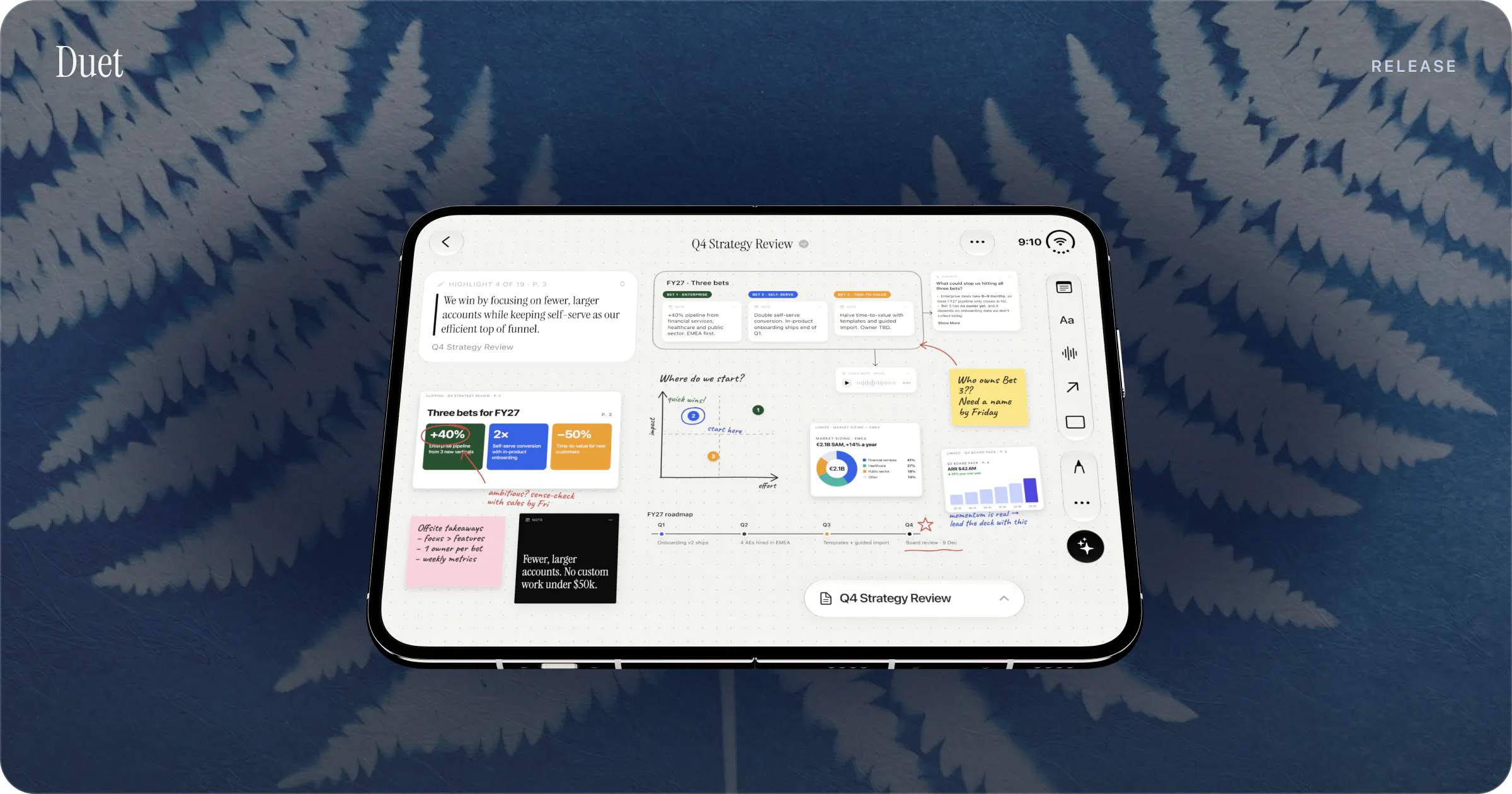
Duet is a PDF reader made for iPhone Duo: read with the phone closed, open it and the page sits beside its Canvas, and every feature stays in every fold. It costs $19.99 once, runs on iOS 27, keeps your documents on the device and answers questions with Apple's on-device AI.
I'm Deepanshi Mamgain, and I make Duet at Conscious Engines Studio. Duet went live on the App Store on 19 October 2026. Version 1.1 followed a day later. iPhone Duo goes on sale on 23 October. This post explains what we built, how it behaves in each position of the fold, and what it doesn't do yet.
Why we built a PDF reader for a foldable
The PDFs people read for work tend to be long and dense, and they get read in pieces. A board pack before a call. A research paper on the train. A contract between meetings. On a phone, you read a paragraph, lose the thread and scroll back. On a laptop, you have room to think but you're rarely at one when the document arrives.
iPhone Duo changes the size of the problem. Closed, it has a 5.4-inch outer display. Open, it has a 7.6-inch inner display, and Apple says both displays share the same aspect ratio. That means one device can be a phone you read with one hand and a page-sized surface you think on.
Apple's own design guidance for Duo asks apps to keep the same functionality and state across displays and poses, and to let the existing layout adapt to the space. Duet follows one rule: the layout changes, every feature stays.
The design side of that rule has its own post: How We Designed a PDF Reader for Every Fold of iPhone Duo. Here is what you'll see as a reader.
Closed: one hand, one column
With the phone closed, Duet is a reader you can hold in one hand. The page fills the outer display and the tools run down the side, within reach of your thumb. This follows Apple's own pattern for Duo: when the device is closed, iOS moves toolbars to the side to save vertical space for content.
The Library shows one column when the phone is folded. Each PDF shows its date, page count and how many highlights you've made, so you can see at a glance where you are in each document. You can import PDFs from Files, Mail and Safari.
Highlight a sentence and it becomes a card, linked to its page. You don't have to open the phone to start thinking. You can collect the passages that matter on the outer display and sort them out later.
Half-open, like a book
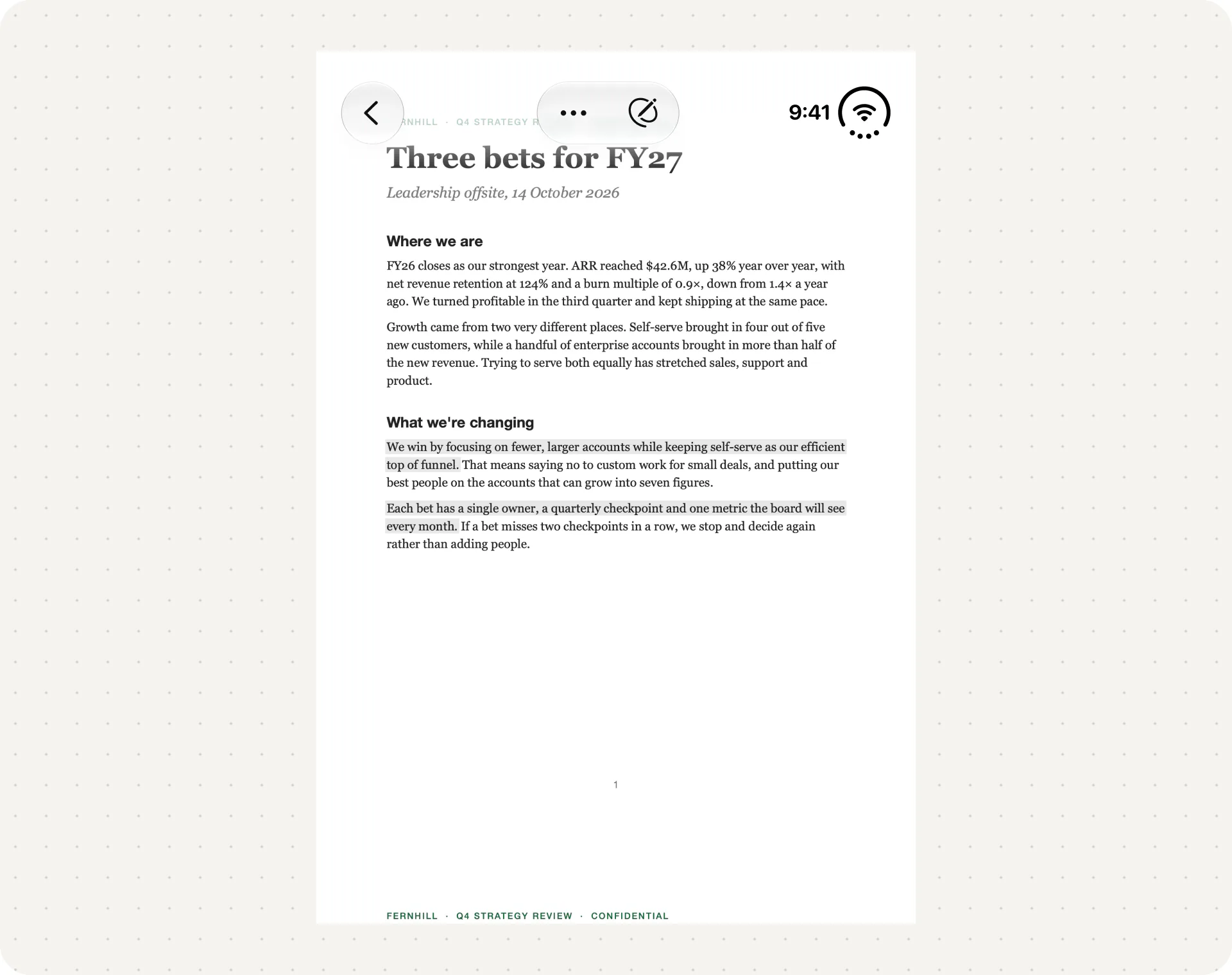
Fold the phone part of the way, the position commonly called book mode, and Duet puts the highlights for the page you're on beside it. One half holds the page. The other holds what you've already pulled out of it.
It works like a paperback with a notebook tucked into the cover. You can read on, glance across at your cards and keep going.
Text flows through the fold. Cards, buttons and sheets stay off it, so nothing you need to tap sits in the crease.
Fully open: the page and its Canvas
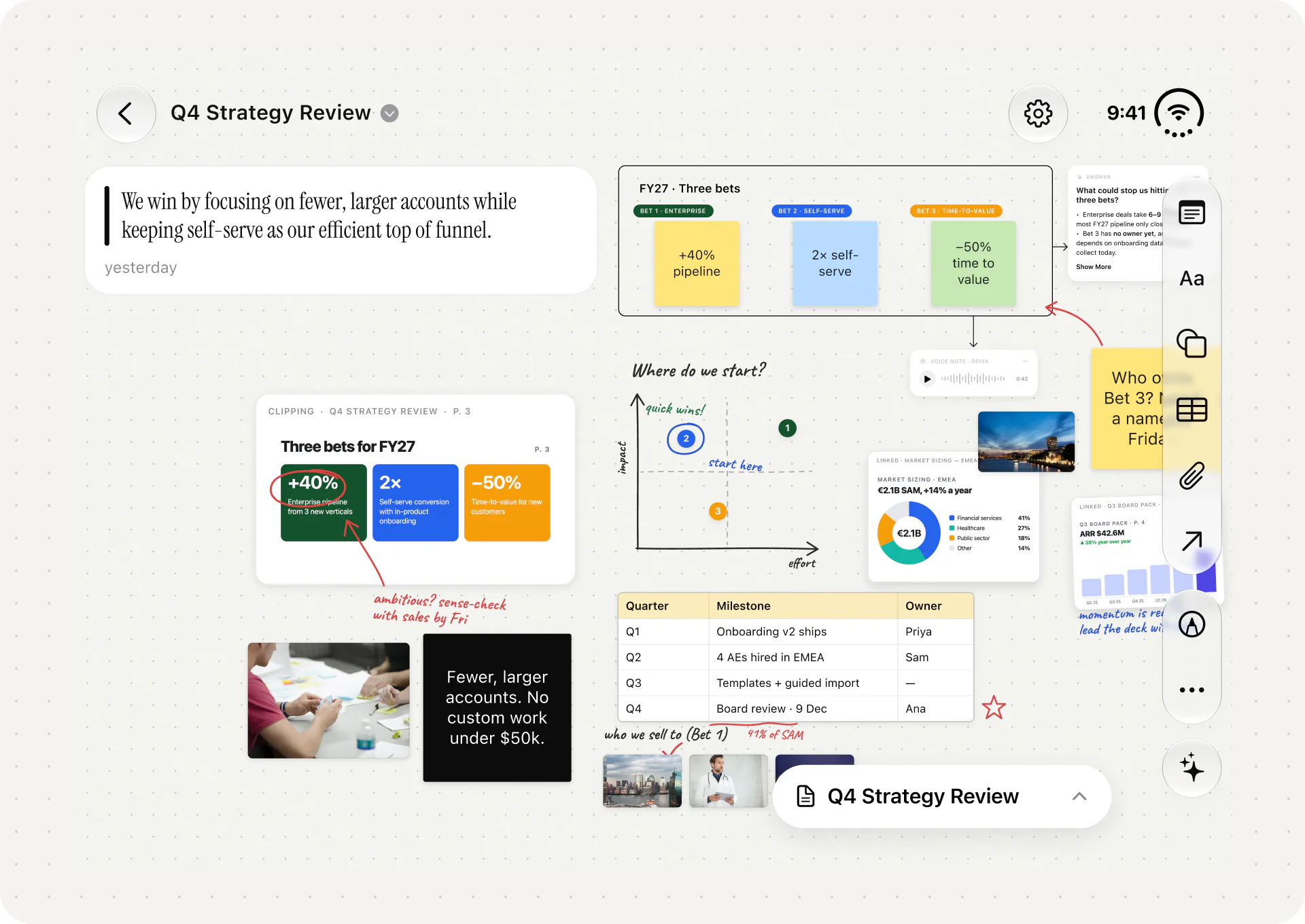
Open the phone flat and the page and its Canvas sit side by side on the inner display.
The Canvas is where Duet stops being a reader and becomes a place to work something out. Every highlight arrives on it as a card linked to its page. On the Canvas you can:
- clip passages from the PDF and drop them on as cards;
- add sticky notes and text;
- group ideas and connect them with shapes and arrows;
- lay out numbers in tables;
- add photos from your photo library;
- draw with your finger;
- record voice notes, which are transcribed on the device and searchable.
Each card stays linked to the page it came from. The point is to keep the evidence and your thinking in one place, so you can answer the question the document was sent to you to answer.
On iPhone Duo, ink is finger-only for now. Apple says support for Apple Pencil with USB-C on iPhone Duo comes later this year. Duet doesn't support Apple Pencil on Duo yet. On iPad, Duet supports Apple Pencil and Scribble.
Flat on a table
Lay the phone partly open on a desk, the position commonly called tabletop, and Duet shows the content on the top half and puts the controls on the stable bottom half. You can read the top half from a little further away and tap the bottom half without the phone rocking under your finger.
Apple's iPhone Duo page describes a similar idea for setting the phone down: content at a comfortable viewing angle, controls at the bottom. It's a good position for following a document during a video call, or for keeping a report open while you write on paper.
Two reports at once: Split View
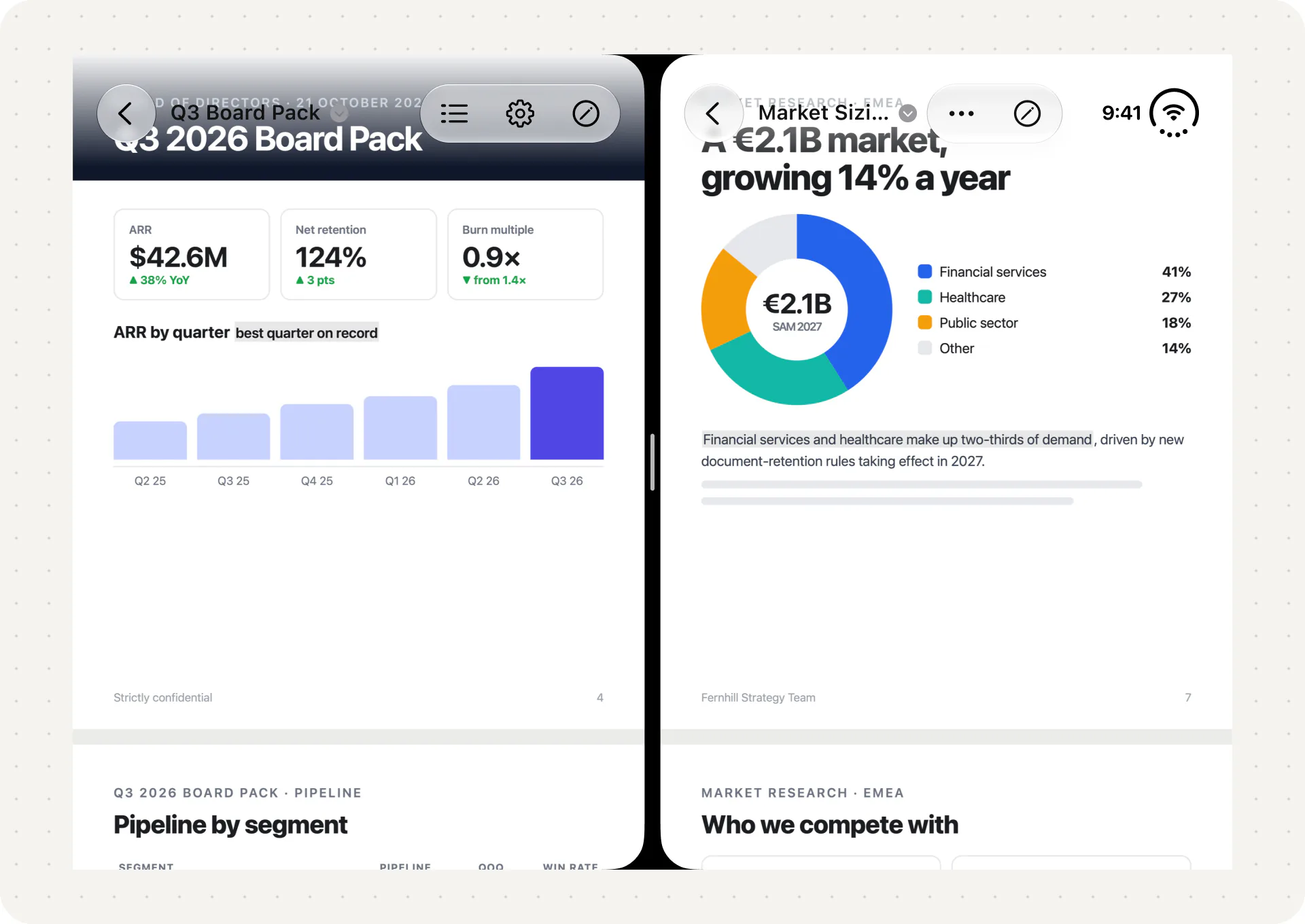
iPhone Duo is the first iPhone with Split View. Apple describes it as two apps side by side on the inner display, two windows of the same app, and saved pairs of apps you can come back to.
Duet supports Split View on iPhone Duo and iPad, so you can keep two reports side by side: last quarter's board pack next to this quarter's, or a draft contract next to the signed one. You can also put Duet beside another app, such as Notes or Mail, and work across both.
We wrote a longer guide to Split View, including twelve app pairs for document work: iPhone Duo Split View: 12 App Pairs for Document Work.
Private AI that answers from your document
Duet has an AI assistant, and it's built on Apple Intelligence. You can ask about a passage, a card or a group of cards, and pin the answer to the Canvas.
Answers come from your document and show the pages they came from, so you can tap through and check. By default, Duet uses Apple's on-device model through the Foundation Models framework. That means it works offline, even on a flight, and the document never leaves the phone.
The on-device model has a small context window, about 4,000 tokens, so Duet doesn't hand it the whole PDF. It first finds the passages that matter, using PDFKit and a private index on the device, then asks the model to answer only from them. Citations come back as structured data, which is why each answer can point to its pages.
For bigger questions across a whole report, you can allow Apple's Private Cloud Compute in Settings. It's only used when you're online and only if you turn it on. Apple says data sent to Private Cloud Compute is used only to answer the request and isn't kept. It has a larger context window, about 32,000 tokens, and Apple sets a daily limit per person. A small label on each answer shows which model produced it. If you ask a whole-report question with no connection, Duet saves it so you can send it later.
Duet runs no AI servers of its own and uses no third-party AI provider. AI features need a device that supports Apple Intelligence. If you want the full comparison of where a document goes with each kind of AI, we wrote it up here: On-Device AI vs Private Cloud Compute vs ChatGPT.
What stays the same in every fold
A few things never change, whichever way you hold the phone.
Your place. Fold, unfold, or leave the phone for hours and Duet returns you to the exact line you were reading.
Your features. Highlighting, the Canvas, voice notes, AI and Split View are available closed, half-open, open and flat. Only the layout moves.
Your look. Duet has six themes: Ink & Paper (the default), Studio Green, Studio Black, Tapestry, Cyanotype and Dawn. Each one changes the background, cards, highlight colour and app icon on both displays. Type, layout and contrast stay the same in all six. There's a post on how we chose them: Six Themes, One Reader.
Your privacy. Duet has no account and collects no data. There are no Duet servers, so nothing is synced to us. Your documents, highlights, Canvas and voice notes stay on your device. If you've turned on Apple's own setting for sharing crash reports with developers, we may get anonymous crash reports through Apple, and that's all.
Duet also has widgets for the Home Screen and Lock Screen. Continue Reading opens the line you left, and its larger sizes also show your latest highlights. Recents shows your latest documents. Latest Highlights shows recent passages from all your PDFs.
What Duet doesn't do yet
I'd rather you hear this from us than find it after you've paid.
- Apple Pencil on iPhone Duo. Not yet. Ink on Duo is finger-only today.
- Sync. There's no iCloud sync between your devices. Each device keeps its own library.
- Other platforms. There's no Mac, Android, Windows or web version.
- Export. You can't export highlights or a Canvas yet.
- One Canvas per document. A Canvas belongs to one PDF. You can't build one Canvas across several documents.
- Editing. Duet doesn't edit, sign or fill in PDF forms. If that's most of what you do, PDF Expert or Acrobat will suit you better, and we compare them fairly in The Best PDF Readers for iPhone Duo.
- Siri and Shortcuts. Duet doesn't work with Siri, Shortcuts or App Intents yet.
- Language. Duet is in English only.
Price and availability
Duet costs $19.99 as a one-time purchase in the US. There's no subscription, no account and no ads. It runs on iPhone, iPad and iPhone Duo, needs iOS or iPadOS 27, and is optimised for iPhone 18 Pro as well as Duo.
iPhone Duo is on sale from 23 October 2026 in more than 70 countries and regions, with 28 more following on 30 October. If you're picking one up, our guide to reading PDFs on iPhone Duo covers what the built-in apps do and where Duet fits.
You can find out more at duetreader.app, or get Duet on the App Store.
Writing about Duet?
If you're covering iPhone Duo apps or PDF readers, we'd be glad to help.
- Press kit: duetreader.app/press.
- Contact: deepanshi@consciousengines.com.
- Facts at a glance: Duet: PDF Reader, by Stackr Labs Inc., trading as Conscious Engines Studio. Released 19 October 2026. $19.99 one-time purchase in the US. Requires iOS or iPadOS 27. iPhone, iPad and iPhone Duo. English only.
- Please don't describe Duet as supporting Apple Pencil on iPhone Duo. It doesn't yet.
One request
Duet is new and has no App Store ratings yet. If it earns a place on your phone, a short review on the App Store helps other readers find it, and it tells us what to build next. If something doesn't work the way you expected, email us at deepanshi@consciousengines.com first.
Thank you for reading this far.
Deepanshi
Sources
- Apple Newsroom, Apple unveils iPhone Duo, 9 September 2026: displays, Split View, app pairs, Apple Pencil later this year, availability.
- Apple, iPhone Duo product page: poses, Split View in landscape, controls at the bottom when set down.
- Apple Developer, Designing for iPhone Duo: same functionality and state across displays and poses, controls on the side.
- Apple Developer News, Prepare and submit your apps for iPhone Duo, 5 October 2026.
- Apple Security Research, Private Cloud Compute.
- App Store, Duet: PDF Reader, version 1.1, checked 20 October 2026.