
The Best PDF Readers for iPhone Duo
Three PDF readers have confirmed iPhone Duo support at launch. Here's how they, Apple's built-in apps and the big names handle the fold, the second half of the screen and Split View.
By Conscious Engines Studio · · 12 min read
Three PDF readers have published iPhone Duo support at launch: Duet, for thinking a document through on a Canvas with private on-device AI; Highlights, which switches to two pages side by side when you unfold the phone; and PDF Viewer by Nutrient, the pick for forms and signatures. PDF Expert, Acrobat Reader, LiquidText, MarginNote 4 and Goodnotes all run on iPhone Duo, but none has confirmed Duo-specific support yet, and Apple's own Preview and Books are covered by Apple's statement that its apps are optimised for Duo.
Prices checked on 20 October 2026. iPhone Duo goes on sale on 23 October. Where a developer hasn't published anything about Duo, we say "not yet confirmed".
What makes a good PDF reader on iPhone Duo
A PDF keeps its page layout, so screen shape matters. iPhone Duo's 5.4-inch outer and 7.6-inch inner displays share the same aspect ratio. Here's what to look for.
The fold. Apple asks apps to keep important elements clear of the centre when the phone is partly folded. A scrolling document can run through the fold; buttons, menus and sheets shouldn't sit in it.
The second half of the screen. When you open the phone, a reader has to decide what goes on the other half: the next page, your notes, or a second document.
The same features closed. Apple asks apps to keep the same functionality and state whichever way you hold the phone.
Split View and windows. iPhone Duo is the first iPhone with Split View. Apple says all apps take part in multitasking, and apps that support multiple windows on iPad get them on Duo too. New windows can only be opened on the inner display.
Apple Pencil. Apple says Apple Pencil with USB-C support for iPhone Duo comes later this year, so plan on finger markup for now.
How the app was built. Every iPhone app runs on Duo, but Apple says apps built with the iOS 26 SDK or earlier sit in the middle of the open display with empty space around them, while apps built with the iOS 27.1 SDK or later fill it. An iPhone Duo badge on the App Store page means the developer submitted Duo screenshots.
The list at a glance
| App | Best for | Price model | AI | Offline | Devices |
|---|---|---|---|---|---|
| Duet | Thinking a document through | $19.99 one-time | On-device Apple Intelligence; optional Private Cloud Compute; page citations | Yes, including AI | iPhone, iPad, iPhone Duo |
| Highlights | Two-page reading and exporting notes | Free; Pro $4.99/month or $29.99/year | Apple Intelligence Writing Tools; Siri questions | Yes | iPhone, iPad, Mac |
| PDF Viewer by Nutrient | Forms, signatures, markup | Free; Pro $6.99/3 months or $19.99/year | AI Assistant (beta), on-device Apple Intelligence | Yes | iPhone, iPad, Mac |
| Preview and Files | Quick viewing, forms, signing | Free, built in | No PDF assistant | Yes | iPhone, iPad, Mac |
| Apple Books | A shelf for PDFs you keep | Free, built in | None | Yes | iPhone, iPad, Mac |
| PDF Expert | Editing PDFs | Free; Premium subscription | PDF Copilot | Reading, yes | iPhone, iPad, Mac |
| Acrobat Reader | Free reading and Fill & Sign | Free; Premium and AI Assistant paid | AI Assistant (cloud) | Reading, yes | iPhone, iPad, Android, desktop, web |
| LiquidText | A workspace across documents | Free; Pro II $89.99 one-time; LIVE subscription | None listed | Reading, yes | iPhone, iPad, Mac |
| MarginNote 4 | Mind maps and flashcards | Free; Pro and Max one-time or subscription | Cloud models, or Apple Intelligence for some features | Partly | iPhone, iPad, Mac |
| Goodnotes | Handwritten notes on PDFs | Free; Essential, Pro or one-time; AI Pass | Goodnotes AI | Reading, yes | iPhone, iPad, Mac |
How each one handles the fold
| App | iPhone Duo support | What goes on the second half | Split View and windows |
|---|---|---|---|
| Duet | Designed for Duo | Your highlights (book pose) or the Canvas (open) | Two reports side by side |
| Highlights | Confirmed, 2026.3 (10 October) | The next page, with Auto two-page layout | Multiple windows; compare two PDFs |
| PDF Viewer by Nutrient | Confirmed, 2026.12 (9 October) | Not described | Not described |
| Preview and Files | Apple says its apps are optimised | Two-page Quick Look reported, not documented | System Split View |
| Apple Books | Apple says its apps are optimised | Not described | System Split View |
| PDF Expert | Not yet confirmed | Not yet confirmed | System Split View |
| Acrobat Reader | Not yet confirmed | Not yet confirmed | System Split View |
| LiquidText | Not yet confirmed | Not yet confirmed | System Split View |
| MarginNote 4 | Not yet confirmed | Not yet confirmed | System Split View |
| Goodnotes | Not yet confirmed | Not yet confirmed | System Split View |
"System Split View" means the app can share the inner display with another app, as every app can on Duo.
1. Duet
iPhone Duo support: designed for it. We make Duet.
Best for: documents you need to reason about and decide on: board packs, research, contracts, reports.
Duet treats the two halves of the inner display as two jobs. One half is the document. The other is your thinking about it.
- Closed: a one-handed reader on the outer display, with tools down the side within thumb reach. The Library shows one column.
- Half-open like a book: the highlights for the current page sit beside it.
- Fully open: the page and its Canvas sit side by side. Every highlight arrives on the Canvas as a card linked to its page, and you can add clips, sticky notes, text, shapes, arrows, tables, photos, finger ink and voice notes.
- Flat on a table: content on the top half, controls on the stable bottom half.
- The fold: text flows through it; cards, buttons and sheets stay off it.
- Folding and unfolding: Duet returns to the exact line, even hours later.
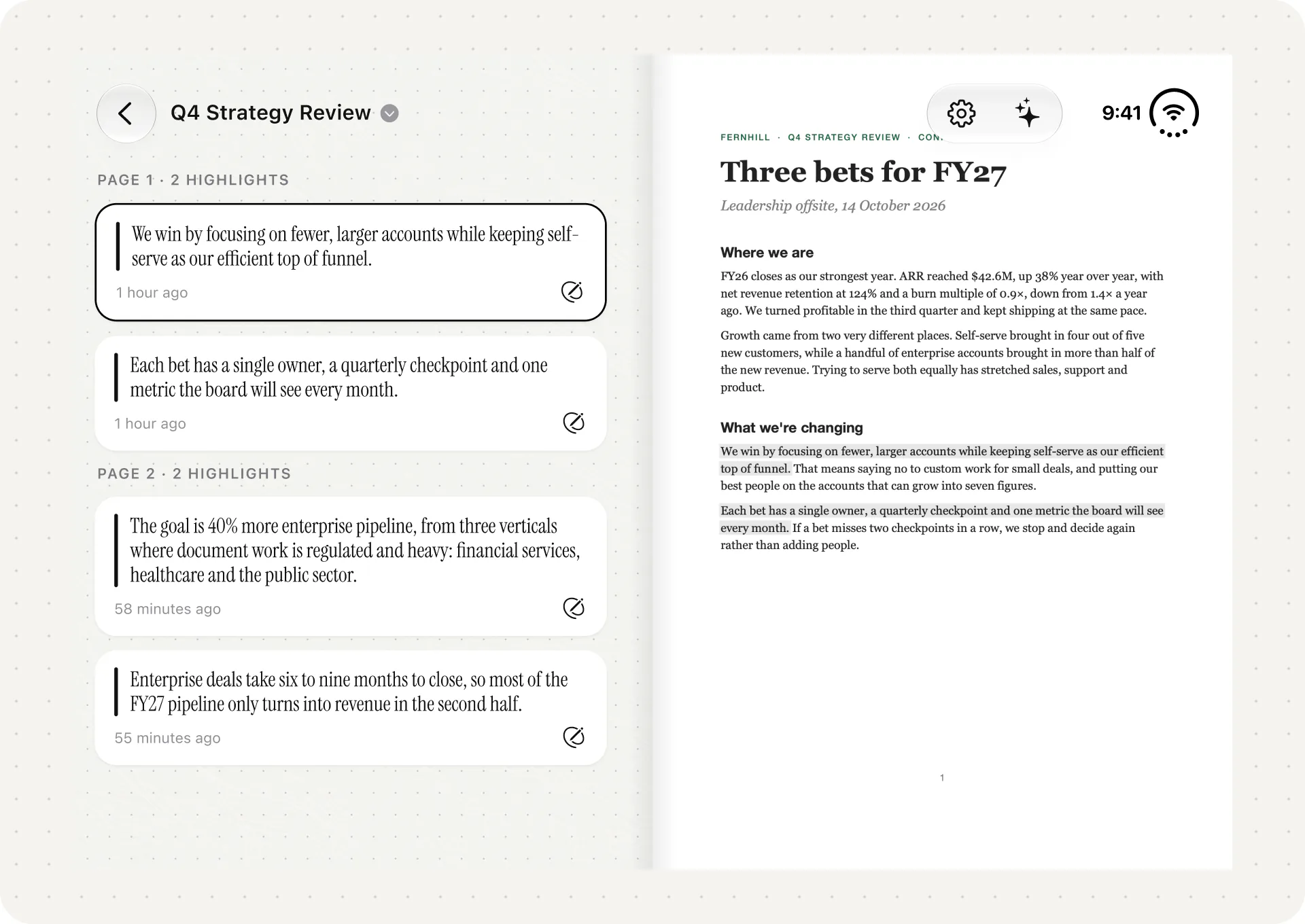
AI: ask about a passage, a card or a group of cards and pin the answer to the Canvas. Answers come from your document with page citations. Duet uses Apple Intelligence on the device by default, so it works offline and the document stays on the phone. You can allow Apple's Private Cloud Compute in Settings for bigger questions across a whole report. AI features need an Apple Intelligence-capable device.
Trade-offs: Duet doesn't edit, sign or fill in PDFs, has no iCloud sync or Mac app, and can't export highlights or a Canvas yet. Apple Pencil on Duo isn't supported yet. If you want two pages of a PDF side by side like a printed spread, Highlights is built for exactly that.
Price and platforms: $19.99 one-time, no subscription or account. iPhone, iPad and iPhone Duo; requires iOS 27. More in Duet: Made for iPhone Duo.
2. Highlights
iPhone Duo support: confirmed. Version 2026.3 (10 October) and 2026.3.1 (19 October) are described in the release notes as the iPhone Duo release.
Best for: reading PDFs like a book and getting your annotations out into other apps.
Highlights has the most detailed Duo release notes of any PDF reader we checked.
- The second half: a new Auto page layout switches from one page to two pages side by side when you unfold the phone, for a book-like spread.
- Both displays: PDFs run edge to edge, folded and unfolded.
- Controls: the toolbar floats in a vertical bar within reach, and you can tap the page to hide it and still mark up.
- Windows: it supports multiple windows. You can compare two PDFs side by side on the inner display, or long-press a PDF in the document browser and open it in a new window.
- Pencil: the developer notes Pencil support on Duo is coming later, in line with Apple.
AI: Apple Intelligence Writing Tools for summarising selected text and rewriting notes, and Siri questions about the open document on iOS 27, on compatible devices.
Trade-offs: exports to Markdown, HTML, TextBundle and other apps are mostly Pro features. Highlights is built around annotations and export more than around a thinking space. We compare them in Duet vs Highlights.
Price and platforms: free; Highlights Pro $4.99 a month or $29.99 a year, one subscription for iPhone, iPad and Mac.
3. PDF Viewer by Nutrient
iPhone Duo support: confirmed. Version 2026.12 (9 October) lists an improved layout on iPhone Duo.
Best for: forms, signatures and careful markup.
PDF Viewer comes from Nutrient, the company behind the PSPDFKit toolkit. Its release notes don't say what it does with the second half of the screen or in Split View.
Good at: filling in and flattening forms, drawing a signature with your finger, highlighting and commenting, and an AI Assistant (beta) that answers questions about documents using on-device Apple Intelligence.
Trade-offs: redaction, merging and other advanced tools need Pro. There's no canvas or notes space beyond annotations.
Price and platforms: free; Pro $6.99 for three months or $19.99 a year. iPhone, iPad and Mac.
4. Preview and Files (built in)
iPhone Duo support: Apple says its apps are optimised for iPhone Duo. It hasn't documented how Preview handles PDFs on Duo.
Best for: opening a PDF quickly, filling in a form or signing.
Since iOS 26, iPhone has had its own Preview app. You can browse and open PDFs directly in Preview, and PDFs you tap in Files open there too. Preview lets you pinch to zoom, show thumbnails, jump to a page, search the text, turn on a dark background, mark up, fill in forms and sign.
The two-page view: in early October, MacRumors and 9to5Mac reported a video posted by the leaker pdfu showing Quick Look on iPhone Duo with a two-page layout in the open book position, with search, markup and share controls down the right side. Apple hasn't documented it, so don't rely on it yet.
Trade-offs: no PDF assistant, no notes space and nothing that collects your highlights in one place.
Price and platforms: free and built in. Our Apple Books vs Files vs Preview comparison goes deeper.
5. Apple Books
iPhone Duo support: covered by Apple's statement that its apps are optimised for Duo. Apple hasn't described how Books shows PDFs on Duo.
Best for: a free shelf for PDFs you want to keep and come back to.
You can save PDFs to Books from Mail, Messages and other apps through the share sheet, and mark them up with the drawing and annotation tools.
Trade-offs: Books is a library first. It has no PDF assistant and no way to gather and connect what you've marked. See Duet vs Apple Books for when that matters.
Price and platforms: free and built in.
6. PDF Expert
iPhone Duo support: not yet confirmed. The latest release notes (7.26.2, 13 October) don't mention Duo, and Readdle hasn't announced Duo support.
Best for: editing PDFs: changing text, swapping images, filling forms and signing.
PDF Expert is the strongest editor in this list. Free features include filling in forms and adding signatures. Premium adds editing text and images, links, outlines and redaction, plus PDF Copilot for summaries, questions and explanations.
On Duo today: it runs, and how well it fills the inner display depends on how Readdle built its current version.
Trade-offs: Premium is a subscription; the App Store lists in-app purchases from $9.99 to $79.99. Readdle's listing doesn't say whether PDF Copilot runs on the device or in the cloud.
Price and platforms: free download; Premium subscription. iPhone, iPad and Mac. Compare in Duet vs PDF Expert.
7. Adobe Acrobat Reader
iPhone Duo support: not yet confirmed. The latest release notes (26.09.50, 16 October) don't mention Duo.
Best for: free reading, Fill & Sign, and working with Acrobat on other platforms.
Acrobat Reader is free and includes Liquid Mode, which reflows some PDFs for small screens, and Fill & Sign. Premium adds editing and conversion.
AI: Adobe's AI Assistant is a paid add-on. Adobe says Acrobat Reader mobile sends the document to its cloud-hosted generative AI service to answer questions.
Trade-offs: the most useful features sit behind subscriptions, and AI questions mean uploading the document to Adobe.
Price and platforms: free; Premium from $9.99 a week to $69.99 a year on the App Store, and AI Assistant listed at $6.99. iPhone, iPad, Android, desktop and web. Compare in Duet vs Adobe Acrobat Reader.
8. LiquidText
iPhone Duo support: not yet confirmed. LiquidText hasn't announced a Duo layout, and its latest release notes (7.3.16, 24 September) don't mention Duo.
Best for: a workspace that pulls excerpts from several documents and connects them.
LiquidText has been on iPhone since version 7.3.0 on 24 March 2026, as well as iPad and Mac. Its workspace lets you pull out passages, squeeze a document to compare sections, and draw lines between ideas in different documents.
Trade-offs: pricing is complicated, with a one-time Pro tier and LIVE subscriptions. Many of the workspace features are paid.
Price and platforms: free; Pro II $89.99 one-time; LIVE $10.90 a month or $99.99 a year. iPhone, iPad and Mac. Compare in Duet vs LiquidText.
9. MarginNote 4
iPhone Duo support: not yet confirmed. The latest release (4.4.6, 23 August) predates Duo.
Best for: studying. One excerpt becomes a highlight, a mind map node and a flashcard.
MarginNote 4 is a deep study tool with mind maps, spaced-repetition flashcards and a Recall mode. Its AI features can use a cloud model, and some, such as Recall hints and Condense, can run on the device with Apple Intelligence.
Trade-offs: it has a lot of features to learn and a lot of interface to fit on a phone. It's hard to judge how it will use the fold until it ships a Duo update.
Price and platforms: free; Pro $12.99 and Max $51.99 one-time, or Max by subscription. iPhone, iPad and Mac. Compare in Duet vs MarginNote 4.
10. Goodnotes
iPhone Duo support: not yet confirmed. The latest release notes (7.1.30, 18 October) don't mention Duo.
Best for: handwritten notes and marking up PDFs with a pen.
Goodnotes is built around handwriting, with searchable handwritten notes and PDF markup. That's exactly what iPhone Duo can't fully do yet: Apple Pencil support for Duo is coming later this year. Until then, Goodnotes on Duo is a finger-writing app.
Trade-offs: AI features need the AI Pass subscription, and the release notes mention cloud transcription.
Price and platforms: free; Essential $11.99 a year, Pro $35.99 a year or a $28.99 one-time option; AI Pass $9.99 a month. iPhone, iPad and Mac. Compare in Duet vs Goodnotes.
Two PDFs side by side on iPhone Duo
If you compare documents for work, use Split View with two windows of one reader (Duet and Highlights both support this), or a PDF in one app and your notes in another.
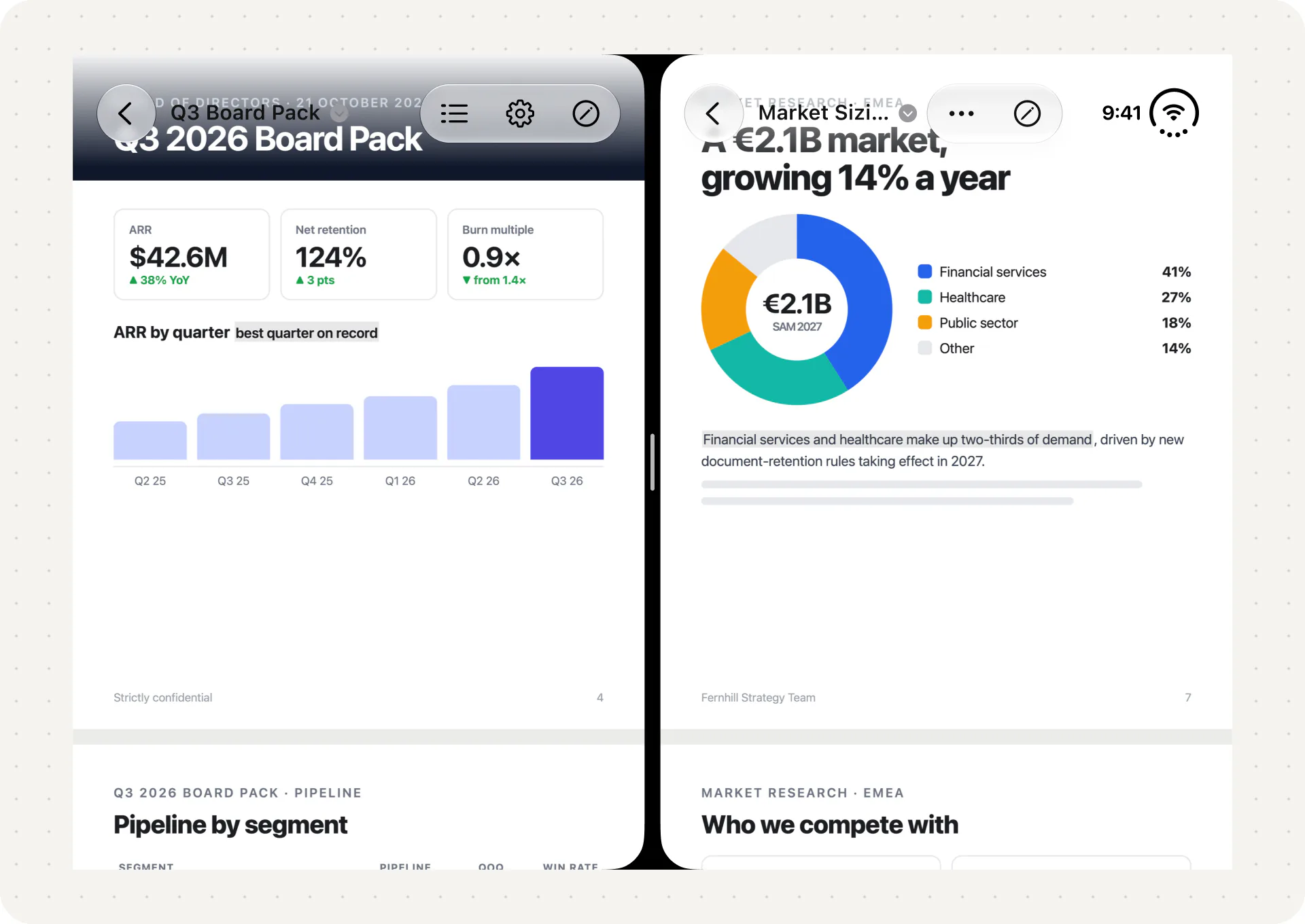
We walk through the steps in How to Compare Two PDFs Side by Side on iPhone and iPad.
How we chose
For each app we checked three things on 20 October 2026: whether Apple or the developer had published iPhone Duo support, what that support covers, and the current price on the App Store or the developer's site.
Confirmed Duo support ranks first, because in launch week it's the clearest sign of how an app will feel on the fold. Apple's free built-in apps come next. Apps without confirmed Duo support come last, ordered by how many people we think will consider them.
This isn't a hands-on review, and we'll update it as developers ship Duo releases. For iPhone and iPad more broadly, see The 10 Best PDF Readers for iPhone and iPad, and for other Duo-ready apps, The 10 Best Apps for iPhone Duo.
To try Duet, visit duetreader.app or get it on the App Store.
FAQ
What is the best PDF reader for iPhone Duo?
For thinking a document through with private AI, Duet. For a two-page spread and exporting annotations, Highlights. For forms and signatures, PDF Viewer by Nutrient. All three have published Duo support.
Can iPhone Duo show two PDF pages side by side?
Yes, in apps that support it. Highlights added an Auto layout that switches to two pages when you unfold the phone. A two-page Quick Look layout was also reported in October, but Apple hasn't documented it.
Do PDF Expert and Adobe Acrobat work on iPhone Duo?
Yes, both run on iPhone Duo. Neither had published Duo-specific support as of 20 October 2026, so their layouts on the inner display depend on how their current versions were built.
Can I use Apple Pencil with PDFs on iPhone Duo?
Not yet. Apple says Apple Pencil with USB-C support for iPhone Duo comes later this year, and each app will need to support it. Today, PDF markup on Duo is done with your finger.
Can I read two PDFs at once on iPhone Duo?
Yes, with Split View on the inner display. See How to Read PDFs on iPhone Duo.
Sources
- Apple Newsroom, Apple unveils iPhone Duo, 9 September 2026.
- Apple Developer, Three steps to make your app shine on iPhone Duo.
- Apple Developer, Designing for iPhone Duo.
- Apple Developer, Leverage multiple displays and scenes on iPhone Duo.
- Apple Developer News, Prepare and submit your apps for iPhone Duo, 5 October 2026.
- MacRumors, Unfolded iPhone Duo Lets You Preview Documents in a Two-Page Layout, 7 October 2026.
- 9to5Mac, Here's what iPhone Duo's new two-page PDF experience looks like, 6 October 2026.
- Apple Support, Open and view PDFs and images in Preview on iPhone and Read PDF documents in the Books app on iPhone.
- MacMost, An introduction to the iPhone Preview app in iOS 26.
- App Store listings and release notes, checked 20 October 2026: Duet, Highlights, PDF Viewer by Nutrient, PDF Expert, Acrobat Reader, LiquidText, MarginNote 4, Goodnotes.
- Highlights, pricing. Readdle, PDF Expert pricing.
- Adobe, Generative AI guidelines for Document Cloud.